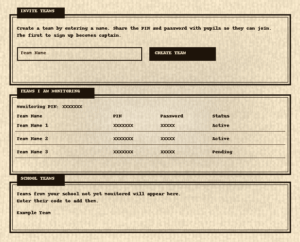
Last year we introduced a new monitoring system that made it a bit easier to keep an eye on your student teams. This year we have upgraded it slightly to make it even easier! As before IT IS NOT COMPULSORY TO USE THIS SYSTEM. Pupils can register on their own, set up their own team and take part, and no-one else has to be involved, however if you do want to keep an eye on the teams in your school, and monitor their progress in the competition it is now possible to do that from your teacher account.
There are two ways to get access to a student team progress page. Both require the students’ consent and both require you to register a teacher account:
- You can use the bulk registration tool to set up one or more teams under your supervision. The team members will still need to register for an account on the site, but when they do that they will use a PIN and password provided by you to join the team you have set up for them. You will be able to see whether or not they have done that from your account area.
- Alternatively, the pupils can setup their own teams and add you as a team monitor by entering your Monitoring PIN into the team page on the Team Captain’s account area. You won’t know the team has been setup until they do that, but when they do it too will appear under the “Your Teams” tab in your teacher account area.
There will also be a list on the “Student Teams” tab showing the teams registered at your school that are not being monitored by you. This will allow you to try to track them down to give them the monitoring PIN. Once a team is monitored by you, you will be able to see their competition entries, print their certificates and manage the team from within your account.
We hope this is helpful, you can read more about how it all works on our How to page.